Recurring meetings with Meekan

Updated: Jul 30, 2026

Meekan, everyone’s favorite scheduling chatbot, just added a great new feature to his rapidly growing list of abilities. Daily, weekly, and monthly meetings!
Ready to get started?
In case you didn’t already know, Meekan is the world’s smartest AI scheduling assistant. It matches everyone’s calendars in seconds to help you find the best time to meet. And it’s totally free to use and available on Microsoft Teams and Slack.

All you have to do is ask Meekan in plain English to make you a meeting, and Meekan finds the best time, sends the calendar invites and even reschedules a meeting in seconds.
So what’s new?
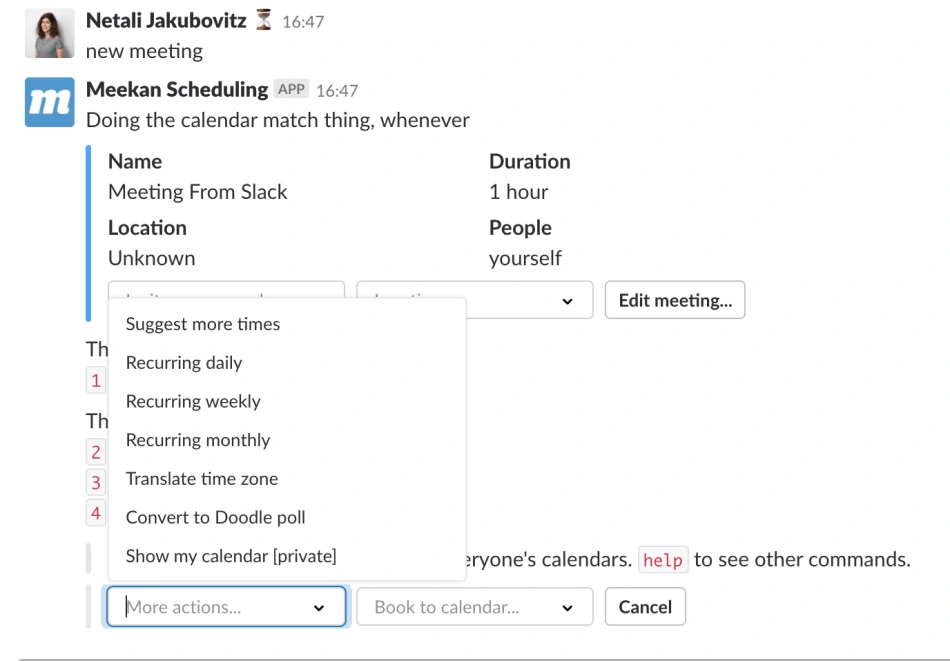
Ask Meekan to schedule a meeting just as you’d ask anyone, ‘Meekan, schedule a meeting with the Sales team sometime next week,’ or ‘Get everyone together for a team meeting’ (see below). Then you can select daily, weekly, or monthly from the drop-down menu and Meekan will check everyone’s availability for the next 7 meetings. He’ll propose a few options and give you a percentage availability for all your participants so you can get a good sense of the best time slot for your recurring meeting. Tell Meekan to book one of the options, and it’ll sync with everyone’s calendar.
Meekan will also keep you posted on all activity after you make the meeting. You’ll get RSVP notifications letting you know the status of your meeting and who’s coming.
Once you start scheduling with Meekan, you’ll wonder how you ever did it without him.
For further reading, consider: https://doodle.com/en/resources/blog/hi-meekan-doodle-welcomes-meekan-the-scheduling-assistant-chatbot/
Ready to get started?
Related content